

.svg)


.avif)
.avif)


.svg)
Why you need this feature
Establishing a signer’s identity is a key part of many digital paperwork flows.
In physical flows, bankers usually ask for an ID proof and then cross-verify the signer details before matching the photo in the ID proof with the signer’s face.
But doing this digitally has been a challenge—until now.
That’s where Face Match comes in. Face Match uses AI to match the signer’s face against a photo of theirs - collected during verification or KYC. eSign is allowed ONLY if the faces match.
44,240 documents stopped from fraudulent signing till March 2026
Flow


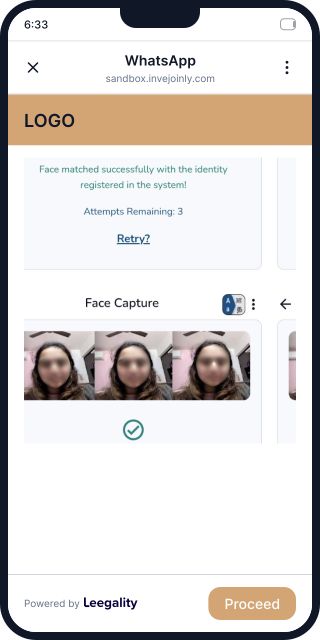

How Leegality Face Match Works
Feature benefits

Heading
Lorem ipsum dolor sit amet, consectetur adipiscing elit. Suspendisse varius enim in eros elementum tristique. Duis cursus, mi quis viverra ornare, eros dolor interdum nulla, ut commodo diam libero vitae erat. Aenean faucibus nibh et justo cursus id rutrum lorem imperdiet. Nunc ut sem vitae risus tristique posuere.

Fraud Prevention:
Only the right signer can execute a document — Face Match verifies their identity against a valid ID before the eSign goes through

Saves time:
If the face doesn't match, the eSign is automatically blocked with no time or effort wasted on fraudulent or incorrect signings

Zero Human Error:
Verification is fully automated, so there's no room for manual oversight or mistakes
