

.svg)



.avif)
.avif)


Aadhaar Face Sign
With Aadhaar Face Sign, signers can eSign with their face - literally:

.svg)
Why you need this feature
Since its inception, Aadhaar eSign has been the popular eSign method. However, OTP based Aadhaar eSign fails due to the following limitations:
📱 Aadhaar is not linked to mobile phones
🏠 In many Tier 2/3 cities and rural areas, people own a single family phone
🔍 IRIS and biometric authentication cause added complexity
In such a scenario, businesses are usually forced to revert back to physical paperwork. With Aadhaar Face Sign you can overcome these limitations and maintain a fully digital journey even if any of the above limitations arise.
Aadhaar face sign lets a person scan their face to capture a signature. Its like digi yatra but for your paperwork.
Pre-requisites for Aadhaar Face Sign: Android Device, Leegality Helper App installed and UIDAI Face RD Service App installed
Flow
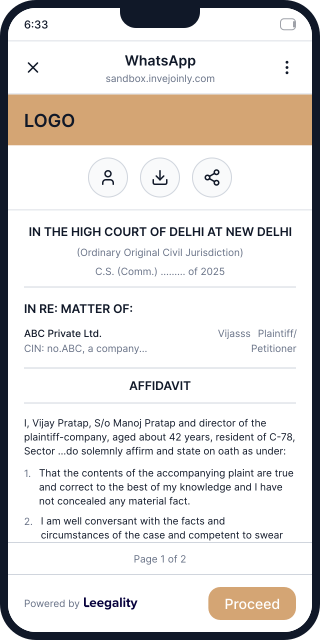
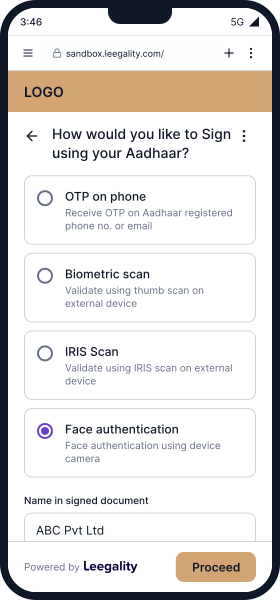
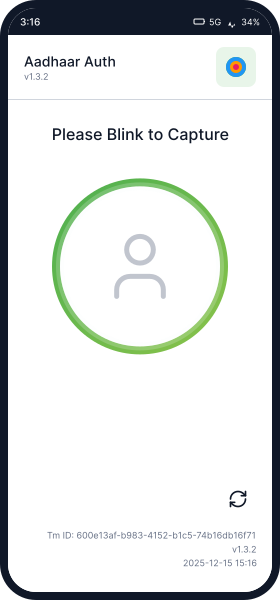
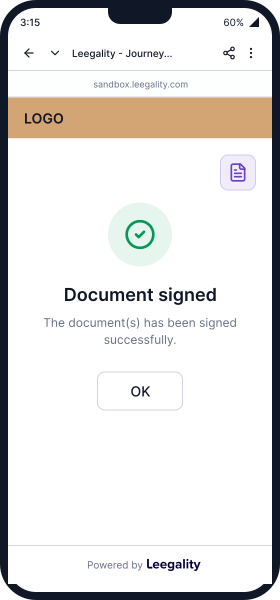
How Aadhaar Face Sign Works
Feature benefits

Heading
Lorem ipsum dolor sit amet, consectetur adipiscing elit. Suspendisse varius enim in eros elementum tristique. Duis cursus, mi quis viverra ornare, eros dolor interdum nulla, ut commodo diam libero vitae erat. Aenean faucibus nibh et justo cursus id rutrum lorem imperdiet. Nunc ut sem vitae risus tristique posuere.

Reliable Backup
Keep signing journeys on track even when OTP or biometric authentication fails — Face Auth steps in as a seamless fallback

No Extra Hardware
Use your branch or field team's existing Android phones and tablets for eSigning — zero investment in additional biometric devices

Zero Integration Effort
Skip complex UIDAI tech setups entirely — Leegality manages the full end-to-end connection with the Face RD App on your behalf
