

.svg)


.avif)
.avif)


Switching to digital stamping can feel like a challenge:
- There's conflicting and confusing information online
- You find vendors that only offer eStamping in limited States
- Some vendors offer non-compliant, illegal eStamps
So if you're currently evaluating a switch from physical to digital stamping, read this guide to know the 5 rules your eStamp flow should comply with.
And if you already have an eStamping solution, you can use this blog to evaluate whether your current eStamp flow is compliant or not.
First, is digital stamping legal in India?
Yes, digital stamping is legal in India.
Section 4 of the IT Act gives the digital copy the same standing as the physical original - as long as the physical copy stays accessible for subsequent reference.
The 5 rules at a glance
Rule 1: Deface the physical stamp paper before you digitize it

What the rule means
Defacement means physically marking the stamp paper so it's tied to the specific document being executed. It's what stops one stamp paper from being reused across two different documents.
How to comply:
Deface the legend of the physical stamps before digitizing it.
Rule 2: First party name appears on the physical and digital stamp paper

What the rule means
The name of the first party to the document has to appear on both the physical and the digital stamp paper.
How to comply:
Ensure the first-party name is there on the physical copy before you scan and digitize it.
Rule 3: Clear indication that the stamp paper is used uniquely for a specific document

What the rule means
It's not enough to indicate the type of document the stamp is for - "this stamp is for a loan agreement" doesn't cut it. The stamp has to be tied to one specific document.
How to comply:
Ensure a unique identifier like a document ID is visible on the legend of the stamp, which ties it to a specific document.
What is a legend?
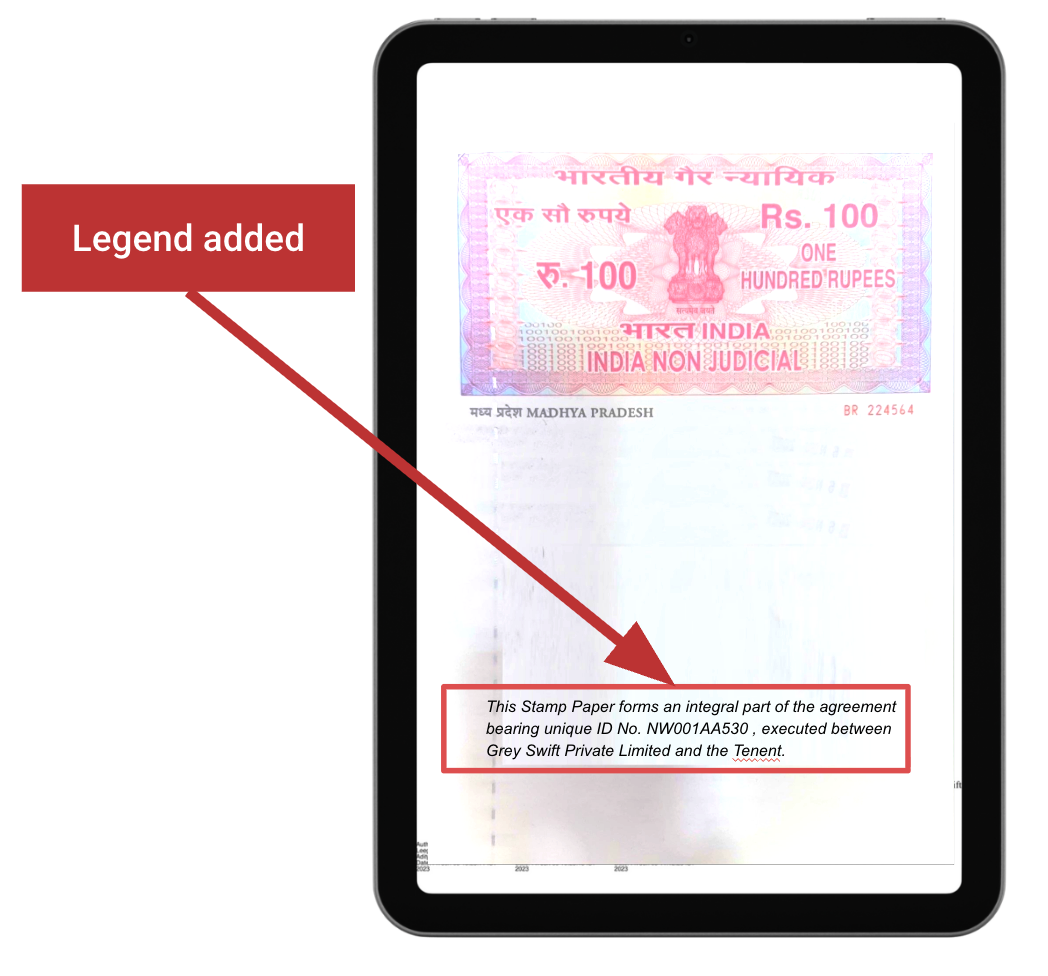
A legend is the descriptive text printed on the physical stamp paper. It defaces the stamp paper and links it uniquely to a specific document or agreement.
A typical legend includes:
- Leegality's Document ID - a unique code that links the stamp paper to its corresponding document in Leegality's system
- First party name
- Second party name
- Description of the agreement/instrument
Rule 4: Use stamps from government-authorized vendors - not receipts or self-made copies

What the rule means
The stamp paper has to come from a government-authorized stamp vendor - or from a provider that itself holds state-government authorization to generate stamps, like SHCIL.
NeSL, for instance, is authorized by individual state governments to generate stamps directly.
How to comply:
Step 1 - Check the authorized organizations (eGrass, SHCIL, NeSL, etc.) that can generate stamps for the State you want to do stamping in.
Step 2 - Ensure you get eStamps from a vendor that's connected with these authorized organizations.
Rule 5: Keep the digital stamp identical to the physical stamp

What the rule means
Section 4 of the IT Act, 2000 gives the digital copy the same standing as the physical original - but only while an identical physical copy stays "accessible so as to be usable for a subsequent reference."
This means the digital version of the stamp should look exactly the same as the physical stamp - including all defacements.
If it's ever called for, you should be able to produce a physical original that matches the digital copy exactly.
How to comply:
Step 1 - Deface the physical stamp with a legend that has a unique identifier and first party name (second party name optional).
Step 2 - Scan the defaced stamp.
Step 3 - Store the physical stamp - so you can produce it during audits and enforcement.
2 mistakes companies make that make their eStamps non-compliant
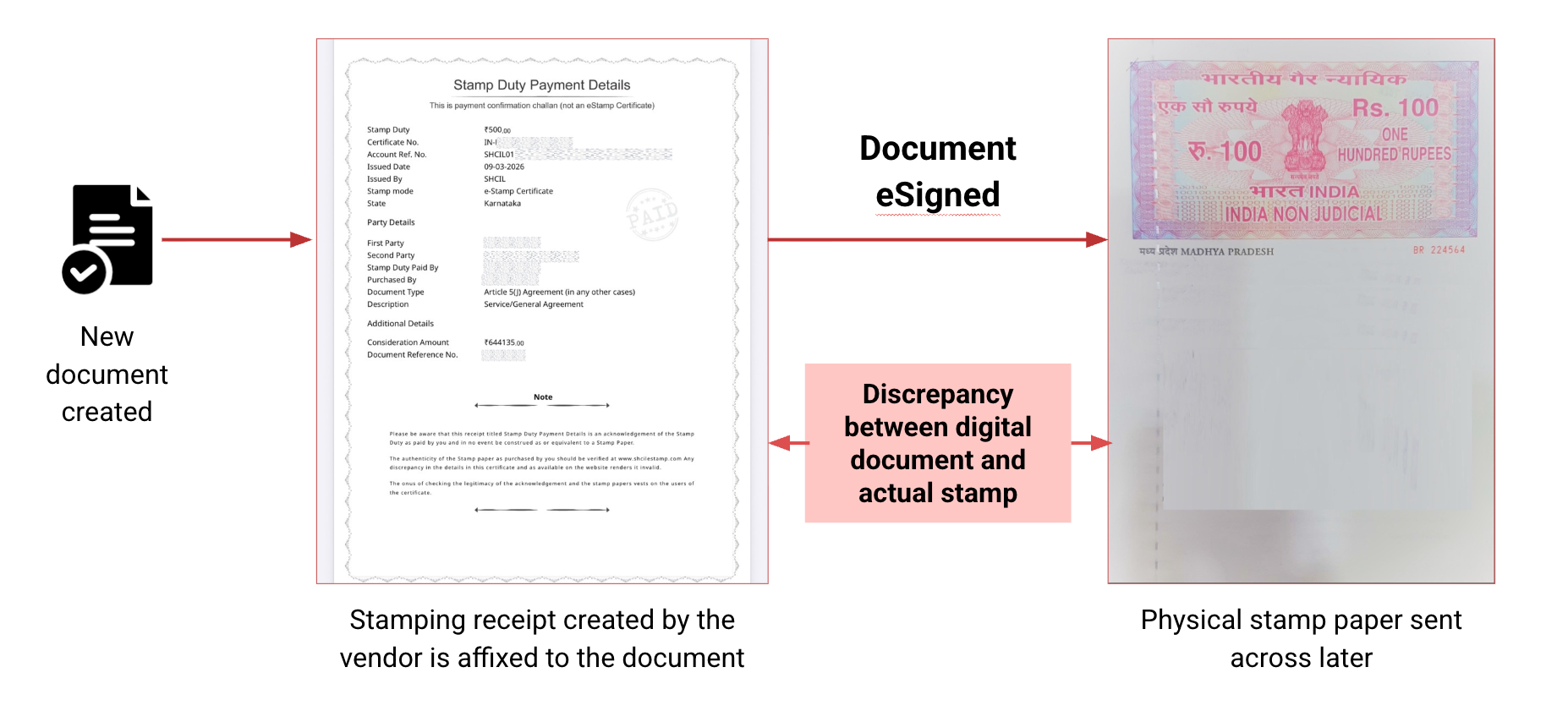
Mistake 1: Affix the payment receipt of the stamp instead of the actual stamp paper - violating Rule 4.
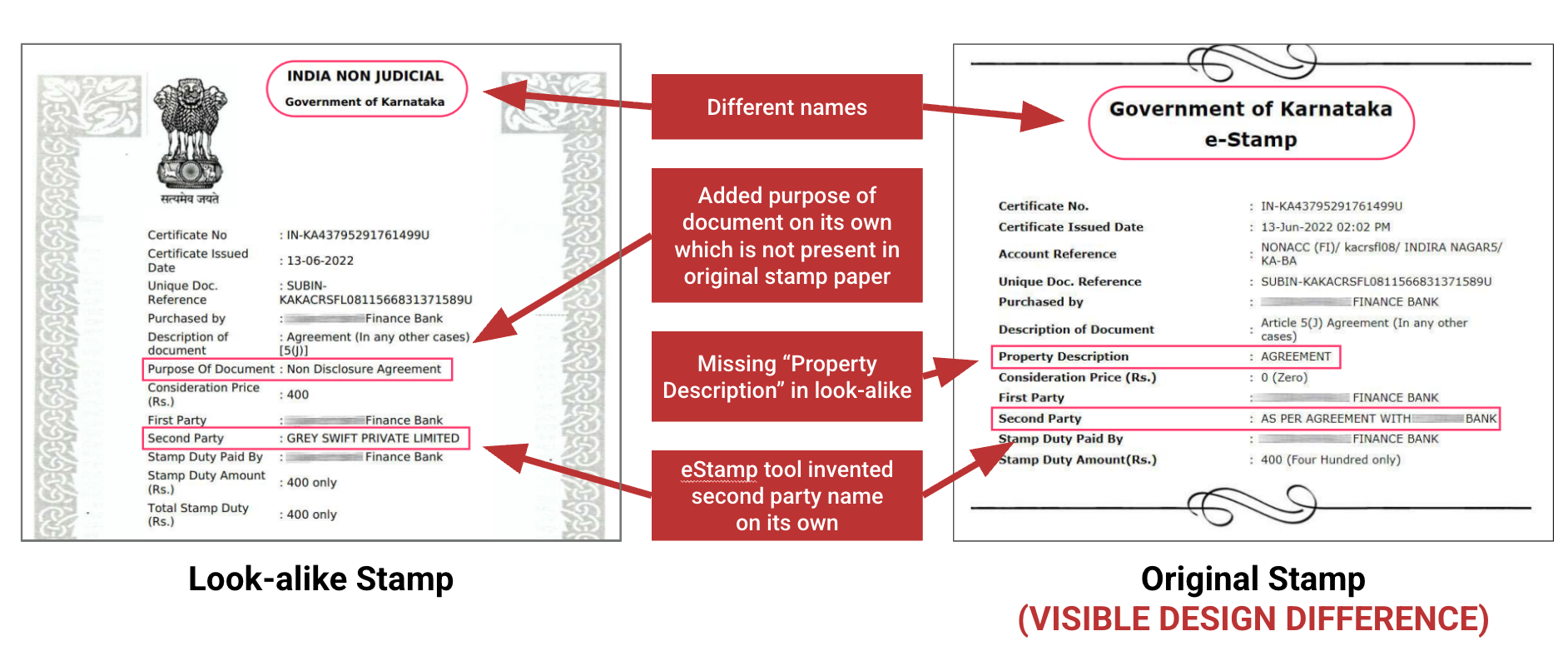
Mistake 2: Instead of using a scanned copy of the physical stamp, they use a recreated digital clone - violating Rule 4.
eStamping compliance checklist
Are you currently evaluating eStamp solutions? Use this checklist to ensure you stay 100% compliant and operationally up and running.
If you already have an eStamping solution, use it to identify the gaps (if any).
Leegality BharatStamp® is 100% compliant - and available in 31 States/UTs of India
Leegality BharatStamp® is India's largest private digital stamping network - used by major BFSI companies, across 31 States/UTs.
Frequently asked questions
Is digital stamping legal and valid in India?
Yes. No stamping law bars affixing a stamp digitally. As long as the duty is paid, the stamp is defaced and affixed to the document, and an identical physical copy stays accessible (Section 4, IT Act), a digitally stamped document is valid.
Can I just affix an e-stamp certificate or payment receipt to my agreement?
No. A payment receipt only proves the duty was paid - it isn't the stamp instrument, and it doesn't satisfy the affixture requirement. The actual stamp, properly defaced and tied to the specific document, has to be affixed.
Do I need to keep the physical stamp paper after digitizing it?
In the general case, yes. Section 4 of the IT Act gives the digital copy equivalence only while an identical physical original stays accessible for subsequent reference. The exception is stamps generated by an authority like NeSL under its own authorization.
Is adding a legend digitally enough?
No. The defacement has to happen on the physical stamp paper before you digitize it. Adding a legend to an already-digitized stamp leaves the physical paper clean and reusable - which is non-compliant.
What happens if my agreement isn't properly stamped?
Under Section 35 of the Indian Stamp Act, a document that isn't duly stamped is inadmissible in evidence. To rely on it, you have to get it impounded and pay the deficient duty plus a penalty of up to 10x the duty before it can be admitted - which delays any enforcement or recovery action.
Does this checklist apply if I use NeSL?
If you use NeSL, the stamp is generated under its statutory authorization and the physical-copy requirement is met at source - so you don't need to run the 5-point checklist manually.
Get your document ready for compliant eStamping
Once your document meets the required digital stamping rules, you need to prepare the PDF for submission or sharing. Use Flatten PDF to preserve the final document and Compress PDF to reduce its file size without changing its format.


.avif)

